Game Jam Day 2
Tag: [day-2]
On this day we refactored the command parser to make it more general and added a player inventory and the ability for rooms to contain items. The game now can handle multi-word commands (like "go north"), and commands that don't consist only of a sequence of fixed strings (like "pick up mushroom"). You can now pick up items, carry them to other rooms, and drop them again.
Lua/Fennel polyglot
We factored out the text I/O main game loop into a separate file, game.fnl. The idea is to run that blocking stdio in a Love thread so that it doesn't block Love's loading process and lets us take advantage of things like love.update. We're thinking of a kind of model–view–controller paradigm, where the game state (the state table in game.fnl) is the "model", the I/O loop in game.fnl is the "controller", and the love code in main.fnl is the "view". The view manages things that are not technically part of the game state, but still require managing state, for example fades between different audio effects.
To create a thread, you need to pass a filename to love.thread.newThread. But newThread is expecting Lua code, not Fennel code. If we pass it Fennel code in game.fnl, it will crash with a syntax error.
We first attempted to turn game.fnl into a Lua/Fennel polyglot program. That means the same file can be executed as either Lua code or Fennel code, with the same effect. We used the polyglot recipe from here, which looks like this:
;; return require("fennel").install().eval([==[
(print "Hello Fennel")
;; ]==])
The ;; are Fennel comment markers, which hide the remainder of those lines from Fennel. The [==[ and ]==] are Lua long literal string delimiters. When run as Fennel code, the interpreter just executes everything between the first and the last line (which are comments). When run as Lua code, it loads the fennel module and calls eval on a long literal string which is the Fennel code.
But this polyglot recipe didn't work:
game.fnl:1: unexpected symbol near ';'
stack traceback:
        [love "boot.lua"]:345: in function <[love "boot.lua"]:341>
        [C]: in function 'error'
        [love "callbacks.lua"]:181: in function <[love "callbacks.lua"]:180>
        [love "callbacks.lua"]:154: in function <[love "callbacks.lua"]:144>
        [C]: in function 'xpcall'
The problem is that Lua 5.1 and the LuaJIT that is used by Love do not permit empty statements, unlike later versions. Two semicolons in a row ;; have an empty statement between them. That's easy to fix, but even with a single semicolon, there's still an empty statement at the beginning of the file, which is a Lua syntax error.
A small modification to the polyglot recipe makes it work. Change the double semicolons to single, and insert a statement before the first semicolon that is a no-op in both Lua and Fennel:
tonumber {}; return require("fennel").install().eval([==[
(print "Hello Fennel")
; ]==])
tonumber {} is interpreted by Lua as a functioncall with a single argument, a table literal. (No parentheses are required for this special case of function call syntax.) Fennel, in contrast, interprets tonumber and {} as two distinct expressions, a function reference and a table literal respectively. They have no effect when evaluated, as long as there is at least one more Fennel expression following them to become the return value of the file.
There's one more detail to take care of. We want to pass a Channel to the new thread by providing it as an argument to Thread:start:
(local quit_channel (love.thread.newChannel))
(let [game_thread (love.thread.newThread "game.fnl")]
  (game_thread:start quit_channel)))
Those arguments get passed to the loaded file via its ... expression:
(local quit_channel ...)In order to make this work, we have to pass ... through when calling eval in the Lua interpretation of the polyglot program:
tonumber {}; return require("fennel").install().eval([==[
(print "Hello Fennel")
; ]==], {}, ...)
Phil Hagelberg has another example of loading an stdio loop with love.thread.newThread. That one uses fennel.compileString to create a FileData to pass to love.thread.newThread.
(In the end, the polyglot technique is technically not required at all. For the purposes of love.thread.newThread, the file only has to parse as Lua code, not Fennel. So a prefix of return require("fennel").install().eval([==[ and a suffix of ]==], {}, ...) would be sufficient. But it's convenient to be able to, for example, ./fennel-1.6.0 --compile game.fnl while also having the file be loadable with love.thread.newThread.)
Also, the quit_channel passed into game.fnl turned out not to be needed for the purpose we were using it for. You can just call love.event.quit from the thread. We didn't know that at first, because the love.event module is not automatically part of the environment of threads, you have to require it.)
Thinking about object sounds
We have this idea that items should be able to make sound while they are in a room or in your inventory. Also, you should be able faintly to hear sounds that are playing in nearby rooms. We brainstormed some design options.
One option is to use the exits field of room tables as a hint to what rooms are nearby, look up the sounds in those rooms, and play them in the current room. We might also add a sound-exits or similar, to enable sound to travel even if there's not an exit the player can take, for example to make the bell tower audible from various rooms outside.
Another option is not to try to reuse the room topology for sounds, but just to have a handcrafted soundscape in every room. If the room description says "there is a slight whirr of machinery to the east", add that whirr sound (which may be the same whirr sound you would hear if you were to walk east) manually (at a low volume) to the sounds of the current room.
Inventory and objects
We initially had the contents of each room being in a contents field in the big static ROOMS table. But in order to make the contents dynamic, we moved it into a room-contents field of the state table, to ROOMS can remain read-only.
The parser does some simplistic normalization of inputs. The parse command will take any of the inputs "take mushroom", "get mushroom", "pick up mushroom", "get fungus", etc., and turn them into a canonical representation [:TAKE :MUSHROOM].
Bosky Dell
This is a peaceful forested glade. Yellow sunlight filters through the cool foliage. There is an opening in the branches to the north.
There is a mysterious mushroom here.
>acquire mush
[:TAKE :MUSHROOM]
This canonical list representation is returned by the parse function and consumed centrally by execute. It would be neat, and we're thinking of a design where, the different "actors" involved in a command have the opportunity to intervene in the command's execute. Zork has a system like this. For example, drop item could have a default execution that removes the item from your inventory and adds it to the room contents. But the item itself could intervene and change how drop works: like the vase in Colossal Cave, which breaks when you drop it. Or the current room would get a shot at interpreting the command. If none of these other layers has anything special to do, then there would be a default base case execute like our current one.
State representation
We're representing the game state as a state table, which currently looks like this:
(local STARTING-STATE
       {:room :BOSKY-DELL
        :room-contents {:BOSKY-DELL [:MUSHROOM]}
        :inventory [:PENNY]
        :running true})
The engine uses a kind of functional immutable style, where the execute function takes a state table as input and produces a new state table as output. (Rather than mutating global variables.) This is starting to get cumbersome as the state table grows, because in each place where the function can return we have to construct a new state table, usually with just one or two changed fields and the rest copied from the input state table:
    [:GO bearing nil] {:room (or (. ROOMS state.room :exits bearing) state.room)
                       :room-contents state.room-contents
                       :inventory state.inventory
                       :running state.running}
We're going to want some sort of facility for easily and succinctly creating these modified tables.
Story brainstorming
Win Conditions
Let's subvert the Collector trope!
- Identify all the mushrooms by talking to people, finding snippets of a guidebook, listening to a mushroom identification radio station.
- See all the rooms, the puzzles unlock new rooms until you've seen them all.
- Get to the top of the clock tower. Each puzzle involves going up another level. Clear sense of progression as you go up the tower. I can record a song using a metronome to line up with machinery sounds. Machinery sounds get louder as we go up the tower.
- Unlock all the radio stations, the last station is a number station that tells you the key to the top room of the clock tower.
Player motivations
- It's just cool to see things and solve puzzles!
- Something is broken and you need to fix it
- You're looking for something specific but you can't quite remember what it is or why.
New rooms
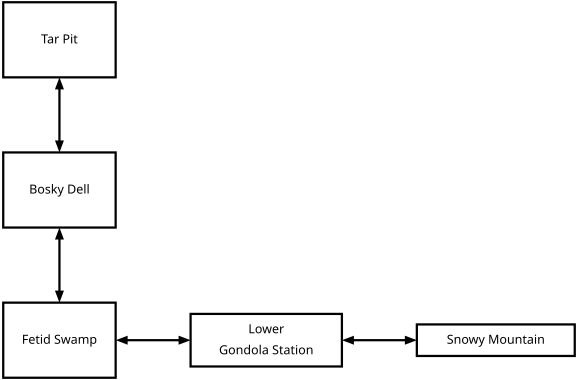
We added two new rooms, the Lower Gondola Station and the top of Snowy Mountain. These two aren't just placeholders—we have plans for them in the game.
Leave a comment
Log in with itch.io to leave a comment.